Database backup that
proves it worked.
Scheduled, encrypted, verified backups for SQL Server, MySQL, MariaDB, PostgreSQL and Firebird — and for the files and folders around them — running as a Windows service on your own hardware. Every archive is re-read, checksummed and test-restored, so the first time you find out a backup is good is not the day you need it.
No subscription. Perpetual licence · Lifetime updates · 14-day money-back guarantee
Most backups fail silently
A scheduled task that writes a file is not a backup strategy. It is a folder full of assumptions. LeoCore removes the three assumptions that cost people their data.
“It ran, so it worked”
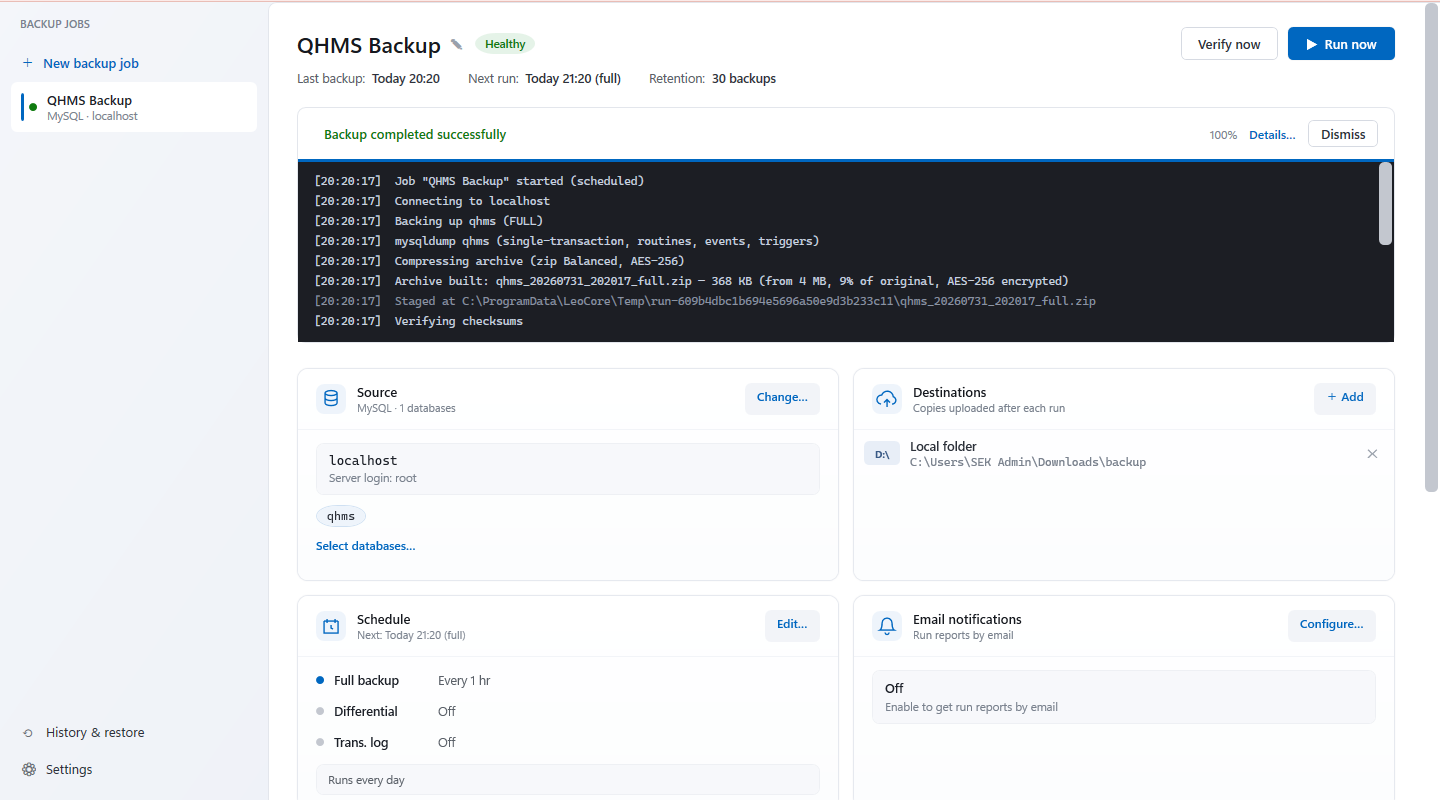
An exit code of zero says the tool finished, not that the archive is readable. LeoCore re-reads every archive after writing it, verifies each entry's CRC and AES authentication tag, and checks the engine's own trailer to confirm the dump is complete.
“We can restore it”
Nobody knows until they try. Datacenter runs scheduled restore drills — it restores the backup into a scratch database, runs a validation query you choose, then tears it down, and tells you the moment a drill fails.
“Ransomware can't reach it”
If your backup share is writable by the server it protects, it is part of the blast radius. Datacenter writes to S3 Object Lock and Azure immutable blobs — storage that physically refuses deletion until the retention period expires.
Everything a production server needs
Built for the people who get the call at 2am — and for the auditor who asks to see the evidence three months later.
When it goes wrong
The five minutes everything else exists for.
It tells you which copy is from before
In a ransomware recovery the hard question is never how to restore. It is which copy is still clean.
- Every restore point is rated — verified, proven by a drill, or suspect
- The timeline marks all three, and the copy to go back to is one action
- Offered even when it is not the newest — which is exactly when it matters
A recovery kit beside every archive
Your archives already open in 7-Zip. What normally dies with the server is knowing which one, in what order, with which password.
- Names every database and the files that make up its chain
- The order they go back in, and the SHA-256 of each
- Where every copy lives, and the exact restore commands for that engine
- Says plainly that it holds no password — and where to look instead
LeoCore Rescue Free
One executable that turns an archive and a password into a database dump. Nothing else needs to exist — including us.
- No installer, no service, no catalogue, no .NET to put on first
- Reads a folder of archives that has no catalogue at all
- Recovers the archive password from the machine that made the backups
- Can live in your storage beside the archives, so the answer needs no internet
Point-in-time recovery Datacenter
Pick any moment on a visual timeline — not just a backup.
- Resolves the full → differential → log chain for you
- Checks LSN continuity before it starts
- Refuses a restore it cannot finish, rather than failing halfway
Notices when the data changed
A backup taken the morning after a script emptied a table is a perfect copy of the damage.
- Compares each backup with the one before it
- Tells you when a table was emptied, dropped, or lost most of its rows
- For files: warns when most of them were rewritten or deleted at once, or renamed
onto an extension like
.locked— how ransomware leaves them - Holds the copy taken beforehand back from retention, so it is still there in a fortnight when somebody notices
Know before it bites
Every remaining way to lose data is something most tools assume rather than check.
Recovery time and data at risk, measured
An observation, not a target copied out of a policy document.
- Exposure is read from the newest archive that actually exists
- An hourly job whose last stored copy is Tuesday reports four days, whatever the schedule claims
- Recovery time comes from a drill that genuinely restored that database, with the size it was measured on
Databases nobody is protecting
The silent total-loss case: a job holds a list of names chosen once, and anything created later is backed up by nothing.
- No run fails, so no ordinary screen has any reason to mention it
- LeoCore compares the server against what the jobs cover, and names the difference
- Knows
tempdb,masterand their equivalents are not oversights
Checked in daylight, not at 2am
Everything a backup depends on rots quietly, and is normally discovered by a failed run in the middle of the night.
- A service account password expires, permissions are tightened, a destination fills up, an upgrade moves
mysqldump - LeoCore tests the connection, the permissions and every destination during the day
- Tells you what would stop tonight's backup while there is still time to fix it
Automated restore drills Datacenter
Proof of recoverability, on a timetable, without a human.
- Restores into a scratch database on a schedule
- Runs your own validation query against it
- Drops it, and emails the result
- File sets too: a sample restored to a scratch folder, every file checked against its SHA-256
An evidence report for auditors
One button, dated, against the controls ISO 27001, NIS2, SOC 2, HIPAA and DORA actually ask about.
- Records what was backed up and what was proven restorable
- Nothing is asserted — every status is derived from records
- Failures stay in, because a report showing only successes tells an assessor nothing
The whole estate, with nothing hosted Datacenter
Twelve servers on one screen, with no console to install and nothing to enrol.
- Every machine writes a few kilobytes of status beside its own archives
- A Datacenter console pointed at that storage reads them all — outcomes, exposure, measured recovery time, next run
- Nothing leaves storage you already own; works over a plain file share
- Every edition publishes. One Datacenter licence shows you the whole estate — you do not have to upgrade the other eleven
Backing up
Native tools, six engines, files and folders, thirteen places to put the result.
Full, differential & log backups
The engine's own tools, not a generic file copy.
- SQL Server — native
BACKUP - MySQL —
mysqldumpwith binlog capture - PostgreSQL —
pg_dumpcustom format - Firebird —
gbakthrough the Services API - Independent schedules per backup type
Six database engines, one licence
No per-engine surcharge and no separate connector to buy.
- SQL Server 2012+ including Express, Azure SQL, Amazon RDS
- MySQL and MariaDB, PostgreSQL
- Firebird 2.5 through 5.0
- Every edition, including the free one
Files and folders, too
The uploads folder, the shared documents, the config beside the database — in the same tool, on the same schedule.
- Folders, single files and network shares, with exclusions
- Open files read from a shadow copy, so Outlook and QuickBooks files are not skipped
- Full and differential, every file checked against its SHA-256
- Browse and search a backup, restore a folder or one file, NTFS permissions included
- One set up to 50 GB on the free edition; unlimited on paid ones
13 storage destinations
On-site, off-site, or both from the same run.
- Local folder, network share, FTP / FTPS / SFTP
- Amazon S3, S3-compatible (Wasabi, MinIO), Backblaze B2, Azure Blob
- Google Drive, Dropbox, OneDrive, OneDrive for Business, Box, Yandex.Disk
Logins and Agent jobs, not just data
A database restored without them is intact data that nobody can sign in to.
- SQL Server logins with their SIDs, so users are not orphaned
- Server role membership, linked servers, Agent jobs
- Scripted into the archive beside the databases — optional, because reading it needs more rights
GFS retention with chain safety
Grandfather-father-son daily, weekly, monthly and yearly rules.
- Keeps what the policy says to keep, and clears the rest
- Never deletes a full backup a differential or log still depends on — the chain is checked first
Auto-discovery
No hunting for bin folders.
- Finds installed SQL Server, MySQL, PostgreSQL and Firebird instances
- And the command line tools each one needs
- On first run, before you configure anything
What protects it
Your backups are yours — readable without us, and unreachable by anyone else.
AES-256 encrypted archives All editions
WinZip AE-2, on by default — in every edition, including the free one.
- Standard Zip64, so an archive opens in 7-Zip on any machine with the password
- You choose the password, or LeoCore generates one
- It shows you that password and keeps reminding you until you have saved it somewhere else — a key that sits only on the server being backed up is not a key
- Turn it off for storage you already control and archives are plain Zip64
Immutable, ransomware-proof copies Datacenter
Backups that a compromised domain admin account cannot erase.
- S3 Object Lock, in governance or compliance mode
- Azure immutable blobs
- Append-only destinations
Nothing phones home
No telemetry, no analytics, and no account required to back up.
- Credentials are sealed with Windows DPAPI and bound to the machine
- They never leave it
- Works in an air-gapped network, including activation
Running it
Set up once, on a server with no desktop, and left alone.
Runs as a Windows service
Unattended, signed out, across reboots.
- Server Core supported — no desktop needed
- Runs under a gMSA or a dedicated service account
- Only the privileges it actually needs
Email alerts with nothing to configure
No mail server, no relay, no port 25, no mailbox password.
- Reports go out over HTTPS through our own mail service
- So they arrive from a locked-down database server that could never send mail before
- Failures only, or every run
- Prefer your own SMTP and sender address? Switch it on and it takes over completely
Updates that install themselves
Press check, and LeoCore does the rest.
- Fetches the installer and verifies its SHA-256 against the published release before anything executes
- Jobs, schedules, credentials and history are never touched
- A failed update rolls back
Logs that name the file
Enough detail to answer a question three months later.
- The archive path, its size, the compression ratio, the SHA-256
- Every destination it reached
- On failure, the complete error — not a code
Three editions, priced by databases
Pick the tier by how many databases you protect. Every edition encrypts, verifies and restores without limits, every edition runs unattended as a Windows service, and every edition backs up files and folders as well — the paid tiers add scale, alerts, cloud storage and compliance.
| Capability | SoloFree | Server$89 once | Datacenter$199 once |
|---|---|---|---|
| Scale | |||
| Databasescounted across all jobs | 2 | Unlimited | Unlimited |
| Files and foldersshadow copy for open files | 1 set, up to 50 GB | Unlimited | Unlimited |
| Backup jobs | 2 | Unlimited | Unlimited |
| Destinations per job | 1 | 3 | Unlimited |
| Automation | |||
| Scheduling — hourly minimum, run windows, weekday & monthly rules | ✓ | ✓ | ✓ |
| Late slots run automaticallyWithin 30 minutes. A slot missed because the server was off is skipped, not replayed as a backlog. | ✓ | ✓ | ✓ |
| Runs while signed out, as a Windows serviceServer Core, gMSA, across reboots | ✓ | ✓ | ✓ |
| Database engines | |||
| SQL Server, MySQL / MariaDB, PostgreSQL, FirebirdFirebird 2.5 to 5.0, full backups | ✓ | ✓ | ✓ |
| Azure SQL DatabaseBACPAC export via DacFx | — | — | ✓ |
| Amazon RDS & Aurora — PostgreSQL and MySQLRDS for SQL Server is not supported: AWS blocks the native BACKUP command it needs. | — | — | ✓ |
| SSH-tunnelled connectionsMySQL and PostgreSQL | — | — | ✓ |
| Backup & restore | |||
| Full backups | ✓ | ✓ | ✓ |
| Differential backups | — | ✓ | ✓ |
| Transaction-log backups | — | — | ✓ |
| Point-in-time restore with chain resolutionNeeds transaction-log backups, so it follows the tier that can make them. | — | — | ✓ |
| Full restore of any archive you holdNever gated. Never expires. Even after a licence lapses. | ✓ | ✓ | ✓ |
| Restore over the original, as a new database, or to a different serverNot gated either — every restore option is in every edition. | ✓ | ✓ | ✓ |
| Storage | |||
| Local folder & network share | ✓ | ✓ | ✓ |
| OneDrive & OneDrive for Business | ✓ | ✓ | ✓ |
| S3, S3-compatible, B2, Wasabi, Azure Blob | — | ✓ | ✓ |
| Google Drive, Dropbox, Box, Yandex, FTP/FTPS/SFTP | — | ✓ | ✓ |
| Bandwidth throttling | — | — | ✓ |
| Protection & assurance | |||
| AES-256 encryption & compression profiles | ✓ | ✓ | ✓ |
| SHA-256 integrity check & archive re-read | ✓ | ✓ | ✓ |
| Engine-level verificationRESTORE VERIFYONLY, pg_restore --list — on every backup, in every edition | ✓ | ✓ | ✓ |
| Scheduled restore drills with validation query | — | — | ✓ |
| Immutable storage — Object Lock, Azure immutable, append-only | — | — | ✓ |
| When it goes wrong | |||
| Known-good restore pointsevery point rated; verified everywhere, and proven by a drill on Datacenter | ✓ | ✓ | ✓ |
| Recovery kit written beside every archive | ✓ | ✓ | ✓ |
| LeoCore Rescuea free download for anyone, licence or not | ✓ | ✓ | ✓ |
| Measured recovery time & data at risk | ✓ | ✓ | ✓ |
| Databases nobody is protecting | ✓ | ✓ | ✓ |
| Daylight readiness check | ✓ | ✓ | ✓ |
| Fleet view across machinesevery edition publishes its status; Datacenter reads the estate | — | — | ✓ |
| Retention & operations | |||
| Keep last N backups of each kind | ✓ | ✓ | ✓ |
| Minimum retention age | — | ✓ | ✓ |
| GFS retention with chain safety | — | — | ✓ |
| Email notifications | — | ✓ | ✓ |
| Windows Event Log integration | — | ✓ | ✓ |
| Slack, Teams & JSON webhooksone POST per run outcome, to your own endpoint | — | ✓ | ✓ |
| Command linerun, restore, status --json, evidence — with exit codes an automation can branch on | — | ✓ | ✓ |
| Commands before and after a runstop a service, back up, start it again | — | ✓ | ✓ |
| Licence & support | |||
| Updates | Free, always | 12 monthsrenewable, never required | 12 monthsrenewable, never required |
| Support | Email, best effort | Email, 2 business days | Priority, 1 business day |
| Commercial use | ✓ | ✓ | ✓ |
LeoCoreAgent service runs
backups on a machine nobody is logged into — across reboots, on Server Core, under a gMSA —
in Solo too, because a free backup that quietly waits for someone to sign in is not a backup.
What the paid editions add is scale and being told: more databases and destinations, cloud
storage, differential and log backups, and email and webhook alerts when something fails.
A backup your attacker can't delete
Modern ransomware hunts backups first. If the account that can write your backups can also delete them, you do not have a recovery plan — you have a second copy in the blast radius.
Object Lock
Write to Amazon S3 or any S3-compatible store in governance or compliance mode. Once written, the object cannot be overwritten or deleted until its retention date — not by you, not by root, not by an attacker with your keys.
Azure immutable blobs
Time-based retention policies on Azure Blob Storage, applied per archive, enforced by Azure itself rather than by our software.
Append-only credentials
Give LeoCore keys that can create objects but not delete them. Retention is then applied by a separate, tightly-scoped identity — so a compromised server cannot prune history.
Protected in about four minutes
Install
Download the installer and run it — there are no prerequisites, and it sets up the Windows service for you in every edition. Without a licence key you are on Solo; entering one later upgrades in place.
Connect
LeoCore finds your local SQL Server, MySQL, PostgreSQL and Firebird instances and their tools automatically. Confirm the credentials and pick your databases — or the folders, files and shares to protect.
Schedule & store
Choose a cadence — hourly upwards — a retention rule, and one or more destinations. The plan preview shows exactly when the next runs will fire.
Verify
Turn on restore drills and email alerts. From then on, LeoCore proves the backup is restorable on a schedule and tells you the moment it isn't.
One payment. Per server. For ever.
Comparable Windows tools charge $129 for the unlimited tier and ask $48–$68 a year on top; two of the better-known ones have gone subscription-only. LeoCore is bought once and keeps working, renewed or not.
Solo
A developer machine or a small shop with a couple of databases.
- 2 databases, 2 backup jobs
- Full hourly scheduling with run windows
- SQL Server, MySQL/MariaDB, PostgreSQL, Firebird
- Files and folders: 1 set up to 50 GB, not counted as a database
- Local, network share and OneDrive
- AES-256 encryption, SHA-256 & engine-level verification
- Unrestricted restore, for ever
- No ads, no telemetry, commercial use allowed
Server
One server, however many databases it has, running unattended.
- Everything in Solo, plus:
- No database limit, unlimited jobs
- Unlimited file sets, no size limit
- Differential backups, of databases and files
- Ransomware warning for files
- All 13 destinations incl. S3 and Azure
- 3 destinations per job
- Email alerts, webhooks & Windows Event Log
- Command line & pre/post-run commands
- Minimum retention age
- Email support, 2 business days
Datacenter
Production servers: point-in-time, immutable, drilled, and visible across the estate.
- Everything in Server, plus:
- Automated restore drills, databases and file sets
- Transaction-log backups
- Point-in-time restore
- Immutable storage & Object Lock
- The estate view across every machine
- Azure SQL, Amazon RDS, SSH tunnels
- GFS retention with chain safety
- Bandwidth throttling & unlimited destinations
- Priority support, 1 business day
Datacenter volume licences
| Volume | Price | Per server | |
|---|---|---|---|
| 1 server | $199 | $199 | Buy |
| 3 servers | $499 | $166 | Buy |
| 10 servers | $1,290 | $129 | Buy |
| Site licence — up to 25 servers, one organisation | $2,990 | $120 | Buy |
More than 25 servers? Ask us — we would rather quote than guess.
What “12 months of updates” means, and what it does not. The licence itself never expires. LeoCore keeps backing up and keeps restoring for ever, whatever you do about renewals — there is no phone-home, no kill switch and nothing to cancel. What the first year covers is new versions and support.
After that, renewing is optional: $29/year for Server, $59/year for Datacenter, 30% of what you paid for a volume licence. Don’t renew and you keep every version you already have, running exactly as it does today. If you would rather never see a renewal email, add updates for life at checkout for the price of the licence again — $89 on Server, $199 on Datacenter — and nothing to renew after that.
We are deliberate about this. A backup tool that stops working because a card expired is a catastrophe waiting for the month nobody notices, and we are not willing to build that failure mode into a product people rely on to survive a bad day.
Prices in USD, exclusive of tax. Our order process is conducted by our online reseller Paddle.com, who is the Merchant of Record for all our orders — VAT and sales tax are calculated and invoiced for you. 14-day money-back guarantee, no questions asked. One-time payment, no subscription, nothing to cancel. Upgrading from Server to Datacenter later costs the difference, not the full price.
Your backups are yours
Restore is never gated by a licence — in every edition, for any archive, for ever. If your licence lapses, backups keep running and every archive you already hold stays fully restorable. Archives are standard Zip64 with AES-256, readable by 7-Zip, so even without LeoCore installed your data is reachable.
And we have finished the thought. An open format is worth less than it sounds if the knowledge of which archive, in what order, with which password lives only on the server that died. So every backup writes a recovery kit beside your archives — the chain, the order, the hashes, the restore commands — and LeoCore Rescue is one free executable that opens them on a machine that has never had LeoCore, or .NET, installed. Put a copy in your own storage and the whole recovery needs no internet, no download page and no vendor.
Your backups do not depend on us continuing to exist. A backup tool that holds your data hostage is not a backup tool, and we will not build one.
Frequently asked
Is this really a one-time payment?
Yes. One payment, one server, and a licence that never expires. LeoCore keeps backing up and keeps restoring for ever, whatever happens afterwards — there is no phone-home, no kill switch and nothing to cancel. We do not sell subscriptions for this product and we are not going to.
The price includes 12 months of new versions and support. After that, renewing is optional — $29/year for Server, $59/year for Datacenter — and it buys updates and support, never the right to keep running. Don’t renew and everything you have carries on working exactly as it does today. You can also add updates for life at checkout and never think about it again.
Is there a limit on how many databases I can back up?
Not on the paid editions. Server and Datacenter both cover as many databases as the machine has — a licence is per server, not per database.
Server used to stop at five, and we removed it. One SQL Server instance routinely
holds eight to fifteen user databases, so the cap pushed ordinary single-server
customers towards Datacenter before they had decided they wanted it, and it made us
spend our time answering whether master counts. The line between the tiers
is a better one now: Server keeps copies, Datacenter proves they restore.
The free Solo edition covers two databases in total, counted across every job on the machine rather than per job.
Can it back up files and folders, not just databases?
Yes, since 4.11. A job can back up folders, single files and network shares instead of databases — with the same schedules, destinations, encryption, retention and alerts. Files another program holds open are read from a Volume Shadow Copy, every file is checked against its SHA-256, and a restore can bring back one file, a folder or everything, NTFS permissions included. The free edition covers one file set of up to 50 GB, which does not count towards its two databases; Server and Datacenter have no limit and add differential file backups and a ransomware warning.
Databases are still backed up through each engine's own tools: copying a live database file produces an image that generally will not restore.
Do you support Firebird?
Yes — Firebird 2.5, 3.0, 4.0 and 5.0, on every edition including the free one. Backups
use Firebird's own gbak through the Services API and are streamed straight to
the machine running LeoCore, so nothing is written on the database server and no file
share is needed.
Your application keeps running throughout: gbak takes a snapshot, so no
exclusive access is required and users are not locked out. Firebird has no incremental
backup that can be restored on top of a gbak dump and no transaction log
backup, so Firebird jobs take full backups only.
One difference worth knowing: Firebird has no way to list the databases on a server, so
you add each one by its file path — for example C:\Data\ACME.FDB — or by an
alias from databases.conf. LeoCore suggests what it can find.
What exactly is a “server” for licensing?
One licence covers one Windows machine running LeoCore, regardless of how many database instances it connects to. If you back up three SQL Server instances from one machine, that is one licence.
Can I upgrade from Server to Datacenter later?
Yes, and you only pay the difference — $110. Email support@seksolution.com with your licence key and we will send an upgrade link. Your jobs, history and schedules are untouched; the new capabilities simply become available.
Does it work on Windows Server Core and in air-gapped networks?
Yes to both. The paid editions run as a service on Server Core with no desktop. For air-gapped machines there is an offline activation flow: you copy a machine fingerprint from the app, paste it into a form here, and paste the signed licence back. After that the app never needs the internet again — licences are verified with a signature, not a lookup.
What happens if my licence check fails or the server is offline?
Backups keep running. A notice appears in the app, and only after a 30-day grace period do new jobs fall back to Solo limits. Existing jobs continue and restore is never affected. We are not going to stop protecting your data over a network hiccup.
Can I move a licence to a different server?
Yes. Release the seat in the app, then activate on the new machine. Hardware replacement and migrations are expected, not penalised.
How do I get the free Solo edition?
Download the same installer everyone else uses and don’t enter a licence key. LeoCore runs as Solo: two databases, two backup jobs, full scheduling, AES-256 encryption and unrestricted restore, free for ever. Entering a key later unlocks Server or Datacenter in place — there is nothing to uninstall and no separate download.
Where is my data sent?
Only to the destinations you configure. LeoCore has no telemetry and no analytics, and database credentials are sealed with Windows DPAPI, bound to that machine, and never transmitted anywhere — including to us.
Do you offer a trial of the paid editions?
Solo is free for ever and is a real product, not a crippled demo. Beyond that, the 14-day money-back guarantee is the trial: buy it, run it against your real workload, and if it does not earn its place, email support@seksolution.com for a full refund.
Find out your backups work
before you need them.
Install Solo free in two minutes, or protect a production server today from $89 — once, not every year.